> For the complete documentation index, see [llms.txt](https://docs.digitalturbine.com/llms.txt). Markdown versions of documentation pages are available by appending `.md` to page URLs; this page is available as [Markdown](https://docs.digitalturbine.com/offerwall-advertisers/tracking-and-attribution/supported-attribution-providers.md).
# Supported Attribution Providers
Attribution providers track user interactions, attribute conversions to their sources, detect fraud, and provide real-time performance data. They also simplify server-to-server postbacks and streamline integration with other systems.
## Configuring Attribution Partners
To integrate your attribution partner and optimize your campaign performance:
1. [Create a campaign](/offerwall-advertisers/acp-edge-advertiser-dashboard/campaign-setup.md) in the DT [ACP Edge](https://acp-edge.fyber.com/login) Console.
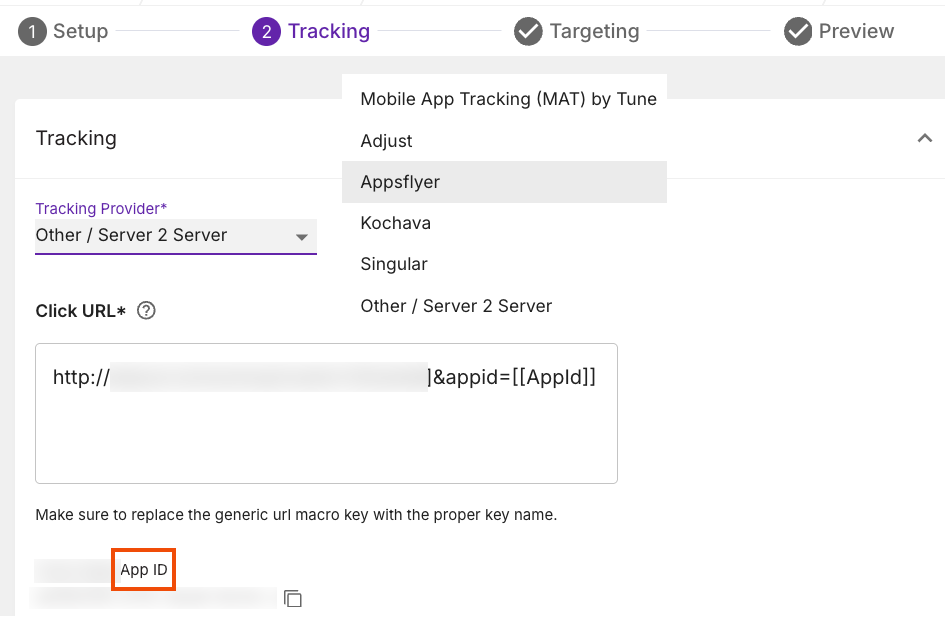
2. Select one of the following tracking providers from the **Tracking Provider** drop-down list on the **Tracking** tab:
* [Adjust](https://help.adjust.com/en/partner-setup/digital-turbine)
* [AppsFlyer](https://support.appsflyer.com/hc/en-us/articles/208209366-How-to-Configure-a-Campaign-with-Fyber)
* [Kochava](https://support.kochava.com/campaign-management/create-an-install-campaign/?scrollto=marker_3)
* [Mobile App Tracking by Tune](https://support.tune.com/hc/en-us/articles/1500008248741-Passing-Values-to-a-Partner-Conversion-URL)
* [Singular](https://support.singular.net/hc/en-us/articles/20797177013659-Digital-Turbine-Media-Attribution-Integration#2_Create_the_Singular_Tracking_Link)
3. Generate a **Click URL** using the provider's instructions. See [Supported Macros](/offerwall-advertisers/tracking-and-attribution/supported-macros.md) for more information.
{% hint style="success" %}
Replace the generic URL macro key with the correct key name.
{% endhint %}
4. Copy the **DT Edge App ID** to update the DT integration with your provider. Then, do the following:
* Log in to your attribution provider's platform.
* Paste the **DT App ID** into the designated field provided by your partner.\
This step ensures proper conversion tracking for old and new App IDs.
{% hint style="success" %}
* Always use the secure HTTPS URL your tracking provider provides to ensure maximum campaign reach.
* Save your **DT App ID** for Server-to-Server postback. Keep this ID secure and confidential to protect your data.
{% endhint %}
## Offer Suppression
Running campaigns across multiple networks may result in users installing your app through a different network. DT uses a suppression feature to prevent duplicate app installs and ensure you are not billed twice for the same user. This feature makes offers unavailable to users who have previously installed the app.
Check your tracking provider's platform settings to confirm they have transmitted the installed data to DT. In most cases, this option is enabled by default. Once your tracking provider reports installs and sessions, DT automatically excludes those users from targeting.
---
# Agent Instructions
This documentation is published with GitBook. GitBook is the documentation platform designed so that both humans and AI agents can read, navigate, and reason over technical content effectively. Learn more at gitbook.com.
## Querying This Documentation
If you need additional information that is not directly available in this page, you can query the documentation dynamically by asking a question.
Perform an HTTP GET request on the current page URL with the `ask` query parameter, and the optional `goal` query parameter:
```
GET https://docs.digitalturbine.com/offerwall-advertisers/tracking-and-attribution/supported-attribution-providers.md?ask=&goal=
```
`ask` is the immediate question: it should be specific, self-contained, and written in natural language.
`goal` is optional and describes the broader end goal you are ultimately trying to accomplish on behalf of the user. GitBook uses it to tailor the answer towards what is most useful for that goal.
The response will contain a direct answer to the question and relevant excerpts and sources from the documentation.
Use this mechanism when the answer is not explicitly present in the current page, you need clarification or additional context, or you want to retrieve related documentation sections.