> For the complete documentation index, see [llms.txt](https://docs.digitalturbine.com/llms.txt). Markdown versions of documentation pages are available by appending `.md` to page URLs; this page is available as [Markdown](https://docs.digitalturbine.com/dt-offer-wall/dt-offer-wall-sdk/sdk-integration/ios.md).

# iOS

{% hint style="info" %}
**Current SDK Version: 3.67.0**

Offerwall and DT FairBid are integrated through the same SDK: the DT FairBid SDK. Apps with an existing FairBid integration can proceed directly to the [Offer Wall Configuration](/dt-offer-wall/dt-offer-wall-sdk/sdk-apis.md).
{% endhint %}

## Prerequisites

| PLATFORM | REQUIREMENT       |
| -------- | ----------------- |
| Xcode    | 14.1 and later.   |
| iOS      | iOS 13 and later. |

## Integration

Digital Turbine supports both CocoaPods and manual downloads to integrate the SDK.

### CocoaPods

Add the following line to your `Podfile` and run the `pod install` command:

{% code title="Ruby" %}

```ruby
pod 'FairBidSDK', '~> 3.67.0'
```

{% endcode %}

### Manual Download

{% @dt-download-buttons/FairBid-Download-Button-ios %}

1. Download and extract the DT FairBid SDK.
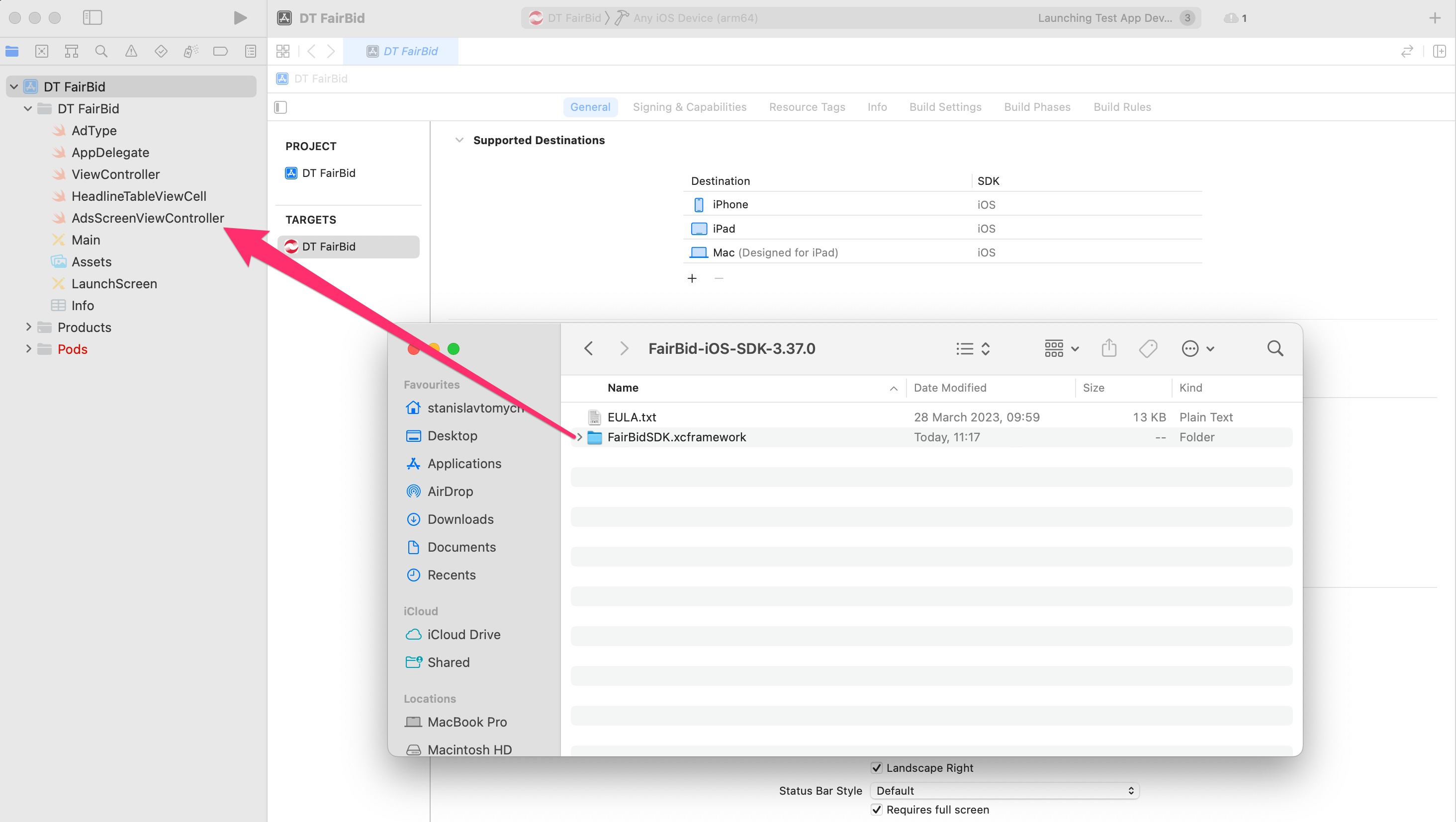
2. Drag and drop `FairBidSDK.xcframework` to your project. The **Choose options for adding these files** window appears.
<div align="left" data-with-frame="true"><img src="/files/6caef3daaeda28809e81e93df7f0c33fe8bfbbca" alt=""></div>

### Configuring Your Xcode Project

Configuration of the Xcode project involves the following steps:

1. [Import System Frameworks](#importing-system-frameworks)
2. [Disable Multitasking](#disable-multitasking)
3. [Disable the Linked Products Build Flag](#disable-the-linked-products-build-flag)
4. [App Transport Security](#app-transport-security)

#### **Importing System Frameworks**

If the **Enable Modules** option (`CLANG_ENABLE_MODULES`) is active in the project's Build Settings, there's no need to import any frameworks manually.

Import the DT FairBid framework umbrella header in your code, for example, in the `AppDelegate` class:

{% tabs %}
{% tab title="Swift" %}

```swift
#import <FairBidSDK/FairBidSDK.h>
```

{% endtab %}

{% tab title="Objevtive-C" %}

```objective-c
import FairBidSDK
```

{% endtab %}
{% endtabs %}

If you cannot enable modules, you might need to add the following frameworks to the **Frameworks, Libraries and Embedded Content** section in Xcode:

* `AdSupport`
* `CoreGraphics`
* `CoreLocation`
* `CoreTelephony`
* `MediaPlayer`
* `MessageUI`
* `MobileCoreServices`
* `QuartzCore`
* `Security`
* `StoreKit`
* `SystemConfiguration`

#### **Disable Multitasking**

Select the **Requires full-screen** checkbox from the **General** tab of your Xcode project's target settings page. This disables multitasking support, which must be disabled for ads to be able to set the orientation of their views.

<div align="left" data-with-frame="true"><img src="/files/bdd027e92dfdf50549db467228513c7ffd379aed" alt=""></div>

#### **Disable the Linked Products Build Flag**

By default, Xcode strips libraries linked to the project. This may result in symbols missing for some ad networks, and subsequently, the DT FairBid SDK may not behave as expected.

To avoid this, set **Strip Linked Products** (`STRIP_INSTALLED_PRODUCT`) build flag to **No**.

<div align="left" data-with-frame="true"><img src="/files/d80ebc778c2762d4844b9fb52ac3f694a4b5bd27" alt=""></div>

#### **App Transport Security**

App Transport Security (ATS) is an Apple security feature that enforces HTTPS connections. Make sure you disable this by setting the **Allow Arbitrary Loads** property to **Yes** so that you get the HTTP traffic as well. For more information, see [ATS Configuration for DT Exchange SDK](/dt-exchange/sdk-configuration/integrating-the-ios-sdk.md#step-4-optionally-configure-tracking-permission-alert-using-att-framework-for-ios-14).


---

# Agent Instructions
This documentation is published with GitBook. GitBook is the documentation platform designed so that both humans and AI agents can read, navigate, and reason over technical content effectively. Learn more at gitbook.com.

## Querying This Documentation
If you need additional information that is not directly available in this page, you can query the documentation dynamically by asking a question.

Perform an HTTP GET request on the current page URL with the `ask` query parameter, and the optional `goal` query parameter:

```
GET https://docs.digitalturbine.com/dt-offer-wall/dt-offer-wall-sdk/sdk-integration/ios.md?ask=<question>&goal=<endgoal>
```

`ask` is the immediate question: it should be specific, self-contained, and written in natural language.
`goal` is optional and describes the broader end goal you are ultimately trying to accomplish on behalf of the user. GitBook uses it to tailor the answer towards what is most useful for that goal.

The response will contain a direct answer to the question and relevant excerpts and sources from the documentation.

Use this mechanism when the answer is not explicitly present in the current page, you need clarification or additional context, or you want to retrieve related documentation sections.
